.png)
Create perfect passport-size photos in seconds. Professional panel with 4x6, A4 layouts, auto background remove, and batch processing.
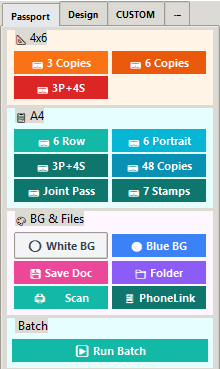
All standard passport and photo sizes in one panel
Built from the real Passport Panel workflow
3 Copies, 6 Copies, 3P+4S mixed layout — one‑click placement.
6 Row, 6 Portrait, 3P+4S, 48 Copies, Joint Pass (35×45mm), 7 Stamps.
White BG, Blue BG, Save Doc (JPG), open output Folder, Scan, PhoneLink.
Single "Run Batch" button with A4/4x6 sheet presets and copy counts.
PPI, margins/gaps, stroke, and custom buttons — all saved to profile.
Secure activation with 7‑day offline window; device binding support.
Complete passport photo workflow in one powerful panel
Click image to zoom • View full interface
Try It Free for 7 DaysGet studio-ready prints in 3 simple steps
Import the photo into Photoshop and launch Passport Panel.
Use auto crop, align and background tools for instant results.
Place on 4x6/A4 template and export for print or delivery.
Fast, consistent passport photos with correct sizes and clean backgrounds. Save time and reduce rework with an easy Photoshop panel.